
CoffeeHouse - Rethinking the Coffee Ordering Journey
CoffeeHouse is a 4-month UX case study focused on improving the coffee-ordering experience. I redesigned the flow to reduce wait times, simplify customization, and encourage café discovery. Through user research, card sorting, and testing, we delivered a seamless, intuitive app backed by a clear IA and design system.

Product Designer
E- Commerce / Academic
4 Months
Mobile Application
Scope
End to End Design Process
5
Challenge
Despite being a daily habit, ordering coffee remained inefficient. Users faced long queues, limited customization, and no easy way to discover new cafés. The process felt repetitive and lacked personalization, especially for commuters and first-time users.
Results
The redesigned app features a clean, clutter-free interface, making it easier for users to navigate and access essential features.
The improved onboarding process resulted in a 35% increase in new user adoption rates.
The addition of personalization and customization options enhanced user engagement, leading to a 25% increase in user retention rates.
47%
Users gave 5 star rating
20%
Increase in user recommending app
84%
Increase in time spent on website
Solution

🔐 Seamless Onboarding
Quick login/signup with a clean, welcoming interface
Designed for both new and returning users
Real-time form validation for smooth entry
☕ Custom Ordering Experience
Modify size, milk, and add-ons with ease
Save preferences for faster reorders
Clear CTA and pricing for better purchase clarity


📍 Location-Based Café Discovery
View nearby CoffeeHouse stores with real-time filters
Toggle between pickup and delivery options
Explore new cafés with map-based navigation
Process
Research & Analysis: We conducted user interviews, surveys, and analyzed in-app analytics to understand the pain points and user needs. We also studied competitor apps and industry trends to gather insights
Information Architecture: Based on the research findings, we restructured the app's navigation and content, prioritizing features and information according to user needs.
Wireframing & Prototyping: We designed low-fidelity wireframes to visualize the new layout and navigation, iteratively refining them based on user feedback. Afterward, we built a high-fidelity, interactive prototype to test the design.
Usability Testing: We conducted usability tests with a diverse group of users to validate the design and identify areas for improvement. Based on the feedback, we made necessary adjustments to the design.
Visual Design & Style Guide: We developed a cohesive visual language, including color schemes, typography, and iconography, ensuring consistency throughout the app. We also created a style guide to maintain design consistency in future updates.
Understanding the target audience
Based on our research, we identified four key user groups with distinct goals and behaviors. These personas helped guide design decisions throughout the project, ensuring we built features that addressed real needs and use cases.


UX Research Method
We used both open and closed card sorting to define a clear, user-centered information architecture:
Open Card Sorting helped us understand how users naturally grouped core features like ordering, profiles, and FAQs.
Closed Card Sorting allowed us to validate and refine our proposed categories based on user expectations.
These insights directly shaped the app’s structure, resulting in a more intuitive and accessible navigation experience.
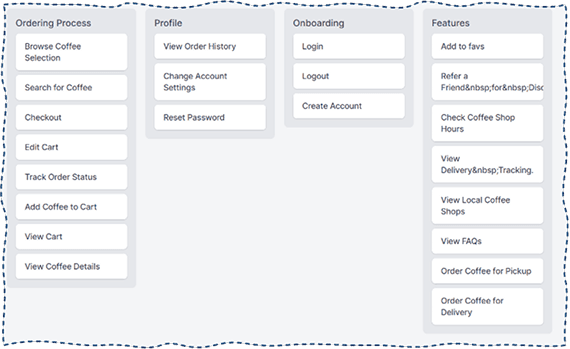

Information Architecture
Card sorting revealed how users naturally group key features, which shaped our app structure. We organized the experience into five clear sections:
Onboarding – Quick sign-up and login
Ordering – Browse, customize, and place orders
Features – Rewards, gift cards, feedback
Cart – Review items and complete payment
Profile – Manage preferences and saved orders

The Final Designs

Conclusion
This project helped me deepen my understanding of how everyday routines—like ordering coffee—can be optimized through thoughtful UX. By combining research, testing, and clean UI design, we created an app that made ordering faster, more personal, and more enjoyable.
Key Takeaways:
Designing intuitive flows starts with understanding real user behavior
Personalization and rewards drive engagement when done simply
Testing early and often helped us refine key interactions quickly
What I’d Do Differently:
Conduct more longitudinal testing to capture real-world usage patterns
Involve stakeholders earlier to simulate a real client-designer dynamic
Explore voice or wearable ordering flows as a future-facing feature